Antenna simulation workbench · openEMS FDTD
Design antennas. See the fields.
Draw an antenna, a microstrip circuit or an array in a ribbon-based 3D designer, or import a CST-compatible VBA macro. Fairbeam meshes it, runs the open-source openEMS solver on the CPU or the GPU, and shows the results next to the model: S-parameters with markers, radiation patterns, surface currents, sweeps, an optimizer, and exports for Touchstone, CST-compatible VBA macros and PCB fabrication.
Free desktop app for macOS (Apple silicon) and Windows. The browser demo is read-only and opens 14 example projects that were simulated beforehand.
How it works
From a model to fields, in one patch antenna
Model it
Draw it in the designer, where every length is an expression over named parameters, or import a CST-compatible VBA macro. The same model can also be one Python file with a
build()that places metal, dielectrics and ports.def build(p): sim = Simulation(1e9, 3e9) sim.metal("patch").AddBox(...) sim.dielectric("substrate", 3.38).AddBox(...) sim.lumped_port(1, 50, ...) return simExact geometry
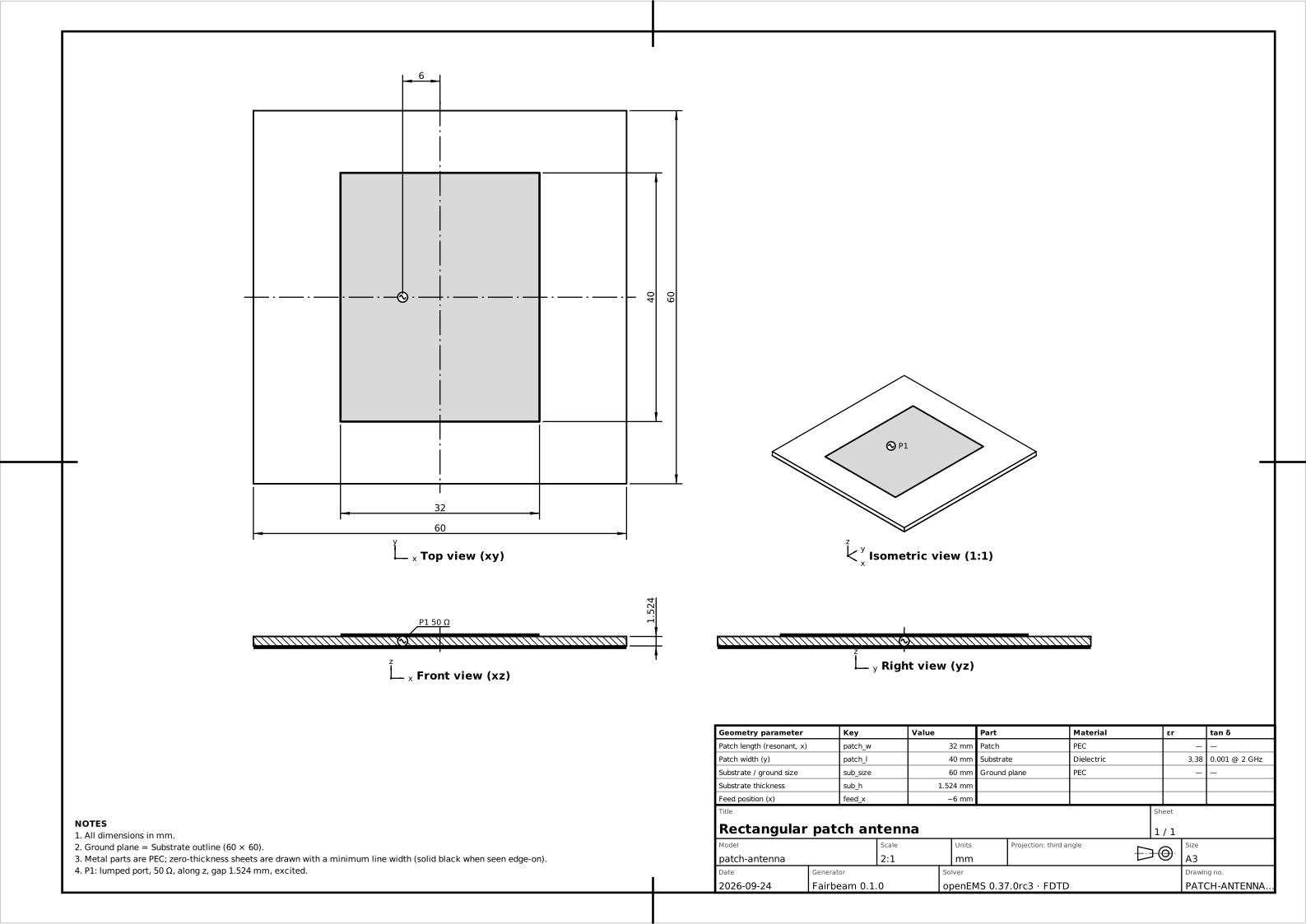
The viewer rebuilds every primitive exactly: a 32 × 40 mm patch on 1.524 mm of εr 3.38, the ground plane and a 50 Ω probe feed.
Meshed for FDTD
Fine cells at the patch edges and in the substrate, coarse ones in the air: 69 × 69 × 58 mesh lines, 263 k cells.
Excited, the currents flow
A Gaussian pulse at the feed rings the patch. This is the surface current openEMS recorded at resonance: strongest in the middle of the patch and falling to zero at the two radiating edges, as the TM010 mode predicts.
It radiates
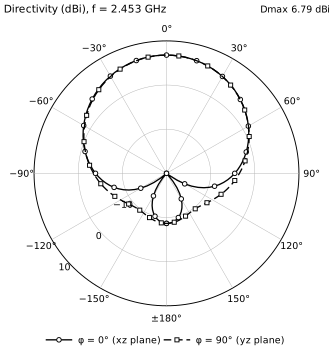
Near-to-far-field transform: 6.79 dBi broadside at 2.453 GHz, 96.5 % radiation efficiency. Radius and color both show directivity.
Checked, then exported
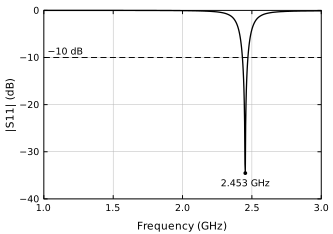
|S11| dips to −34.5 dB at 2.453 GHz, within 0.1 % of the converged mesh. Then everything goes out: a CST-compatible VBA macro, Touchstone, drawings, a report, Gerber files.
Arrays
Four patches, one beam you can steer
One patch becomes four
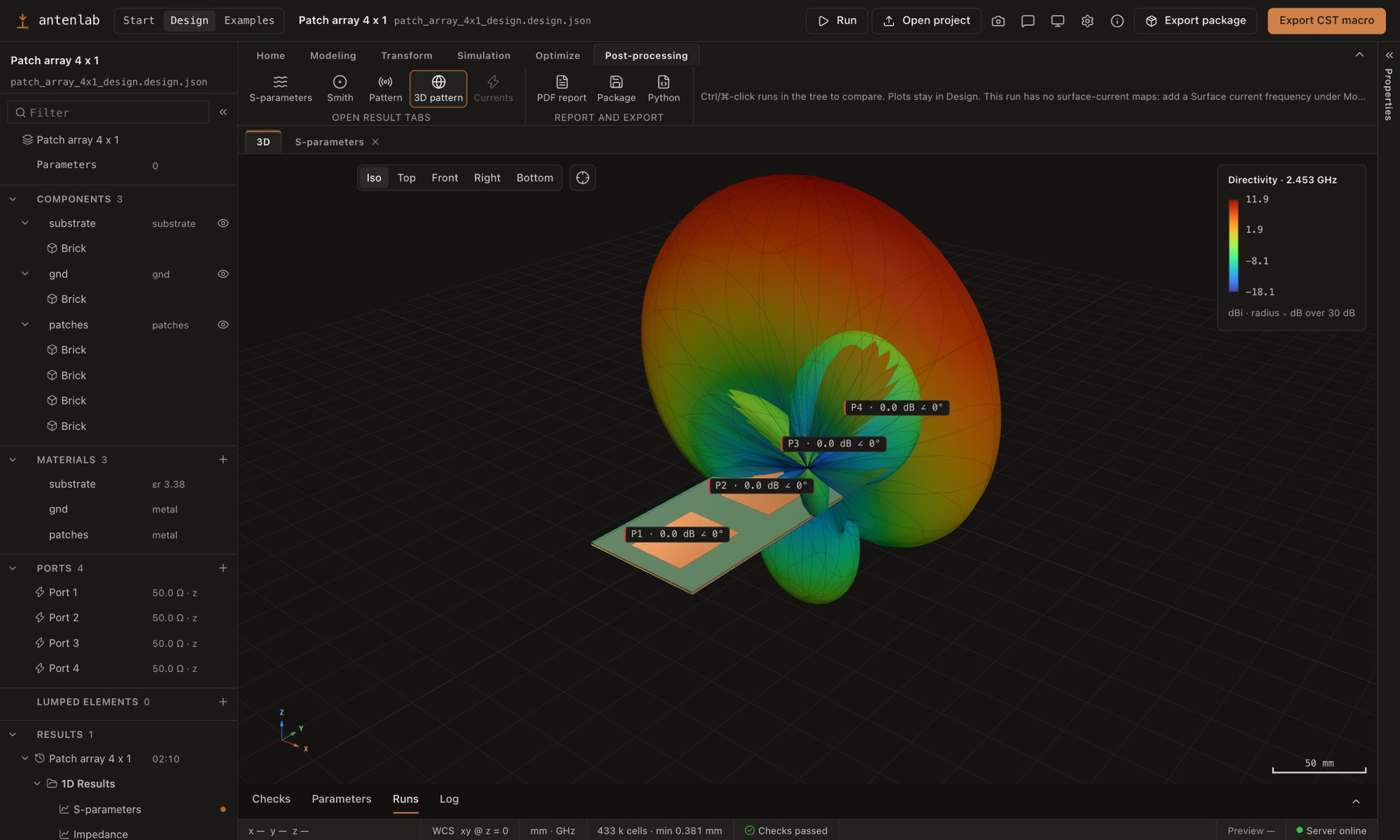
The same patch four times, half a wavelength apart (61.2 mm) on one 66 × 243.6 mm board, each with its own 50 Ω port. Fed in phase they reach 11.9 dBi broadside, about 5 dB above the single patch.
Steered by phase alone
A phase that falls by k·d·sin θ0 from port to port turns the beam. openEMS ran once per port with the other three terminated in 50 Ω (four runs, 18 s on the GPU engine), so every angle here is the weighted sum of four embedded element patterns: coupling included, and each port's active reflection moves with the beam.
Your turn
Steer it. The app does the same for any amplitudes and phases, and exports the steered pattern.
Examples
Horns, helices, fractals and circuits
Pyramidal horn, WR-90
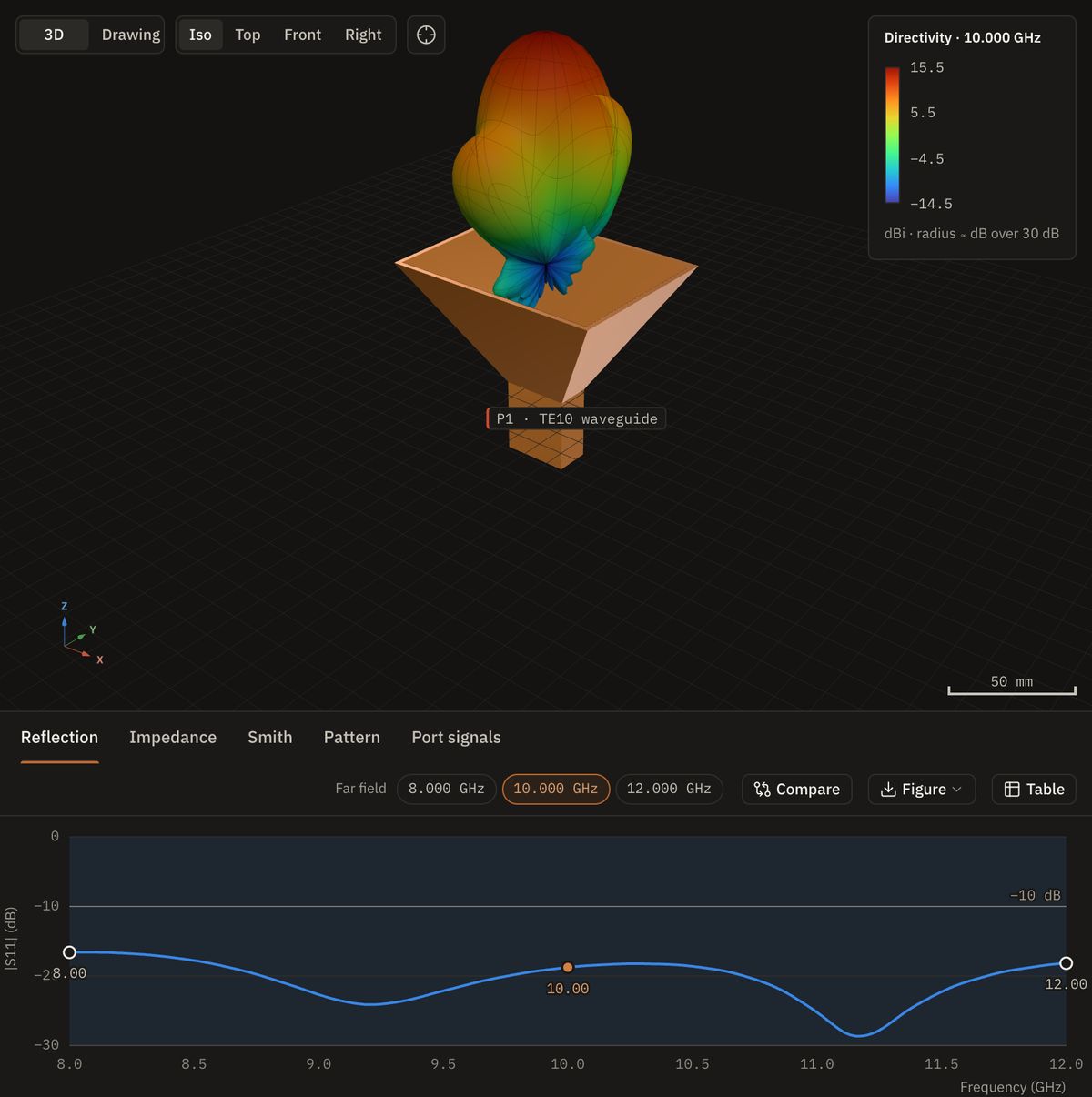
An optimum-gain horn fed by a TE10 waveguide port, with PML boundaries: 15.5 dBi at 10 GHz and |S11| below −16 dB from 8 to 12 GHz.
Axial-mode helix
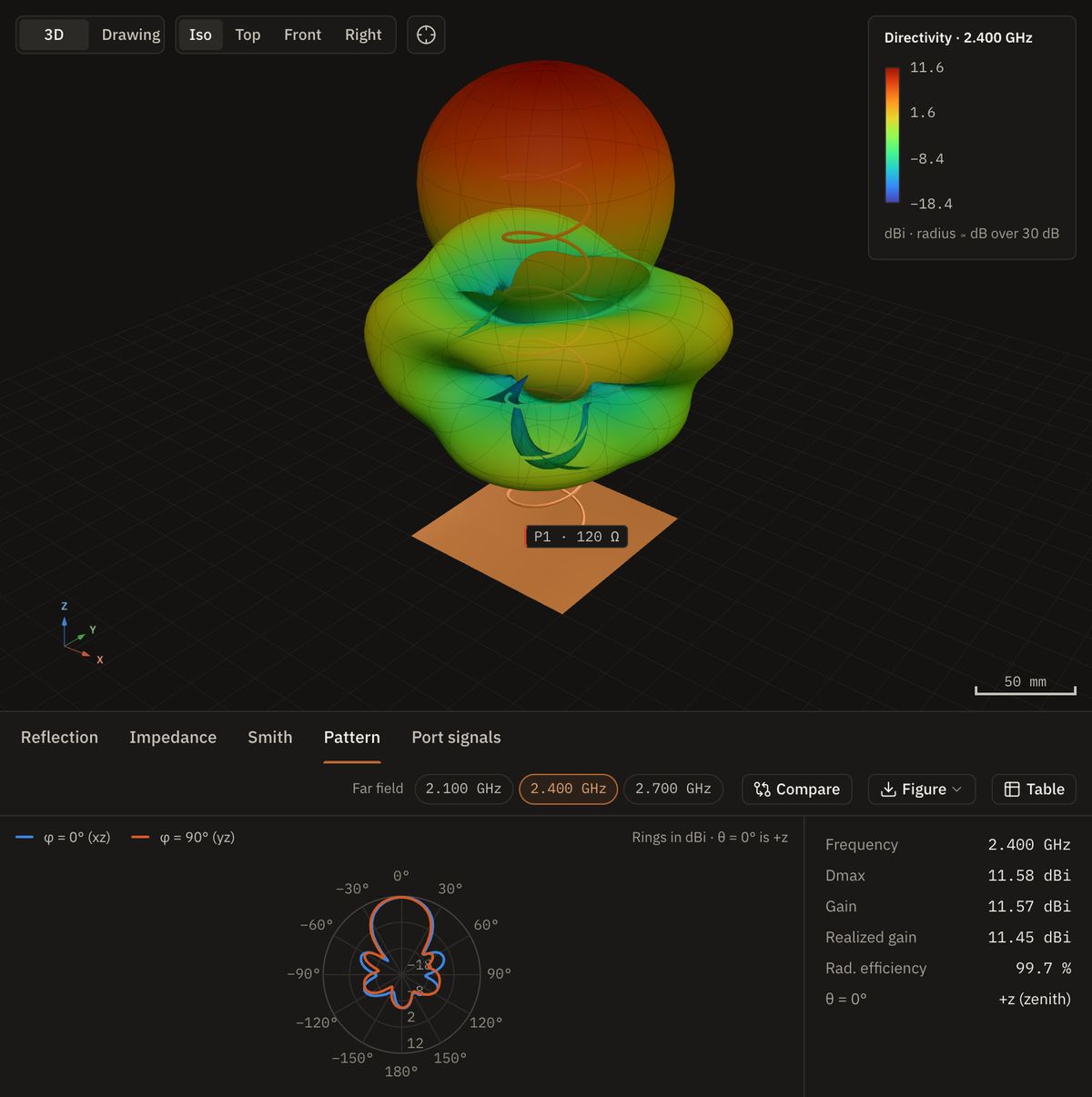
A Kraus helix, seven turns at 13° pitch over a square ground plane: right-hand circular, 11.6 dBi at 2.4 GHz, an axial ratio of 0.9 dB on boresight and the cross-polarized LHCP 26 dB lower.
Minkowski fractal patch
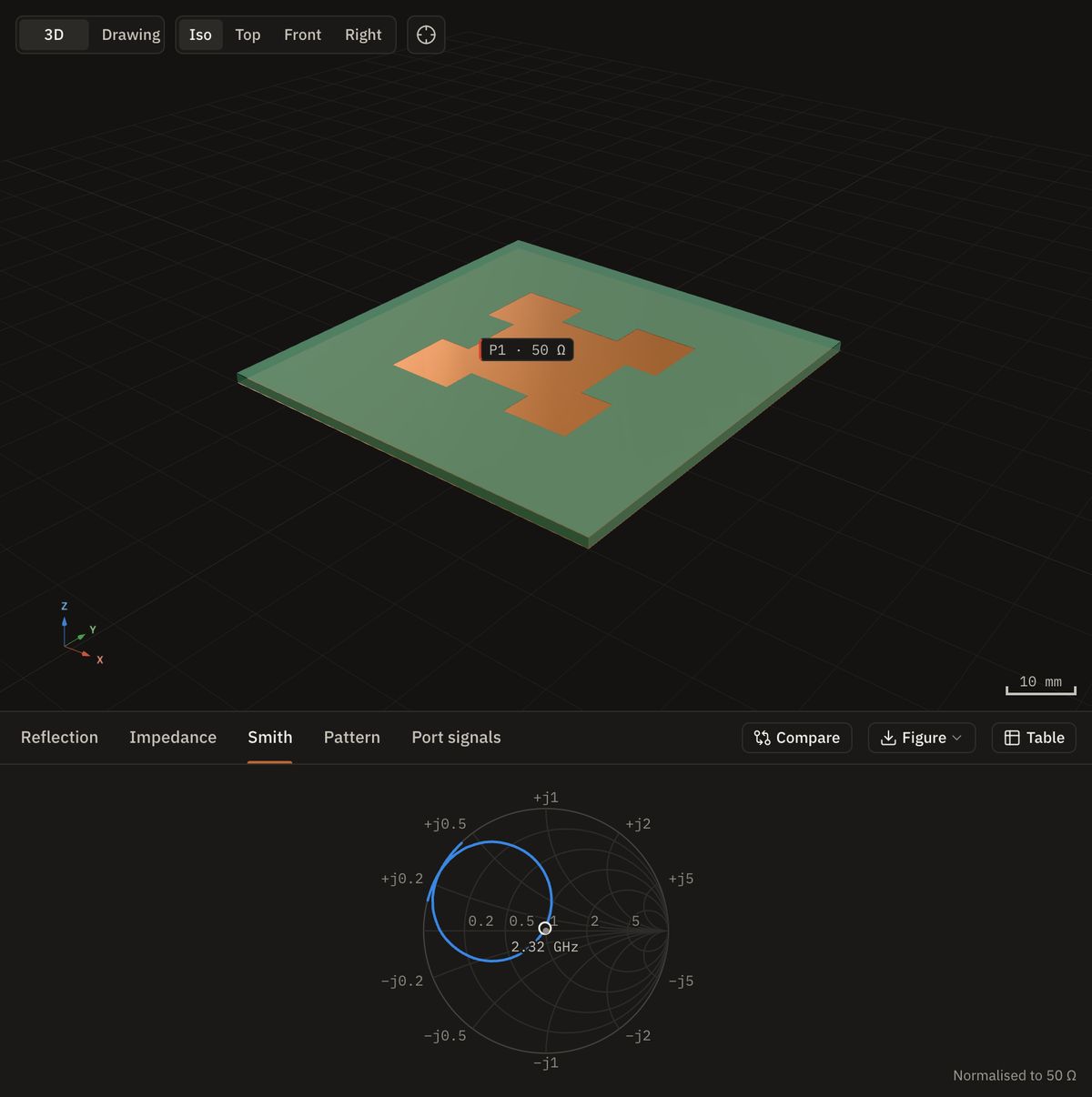
The fractal edge lengthens the current path: 30 × 30 mm of copper resonates at 2.324 GHz, below the 32 × 40 mm plain patch at 2.453 GHz on the same substrate, at the price of bandwidth (0.8 %).
Wilkinson divider
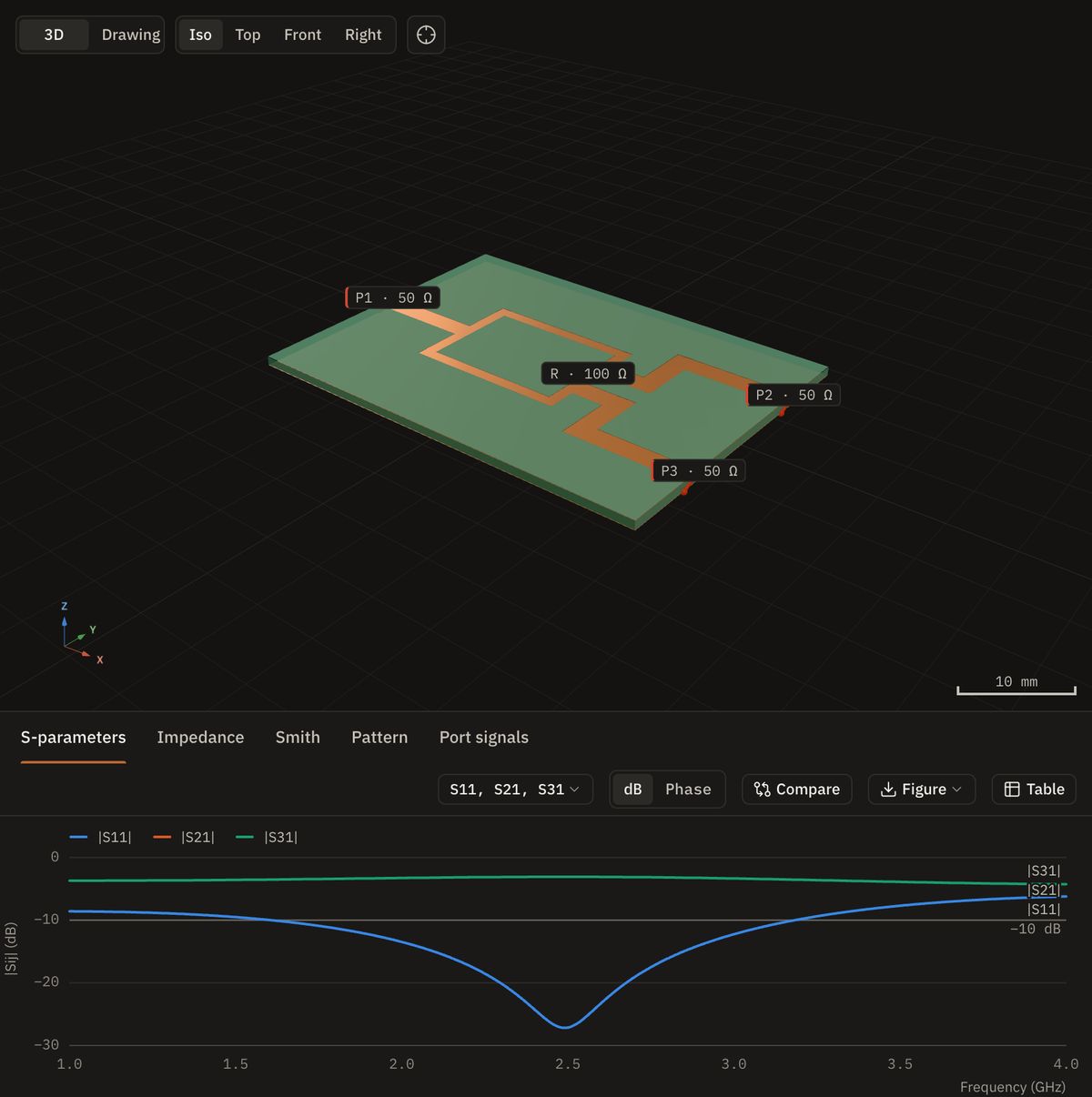
Three ports and one lumped 100 Ω resistor: an equal split with S21 = S31 = −3.09 dB. One openEMS run per driven port gives the full S-matrix.
Branch-line coupler
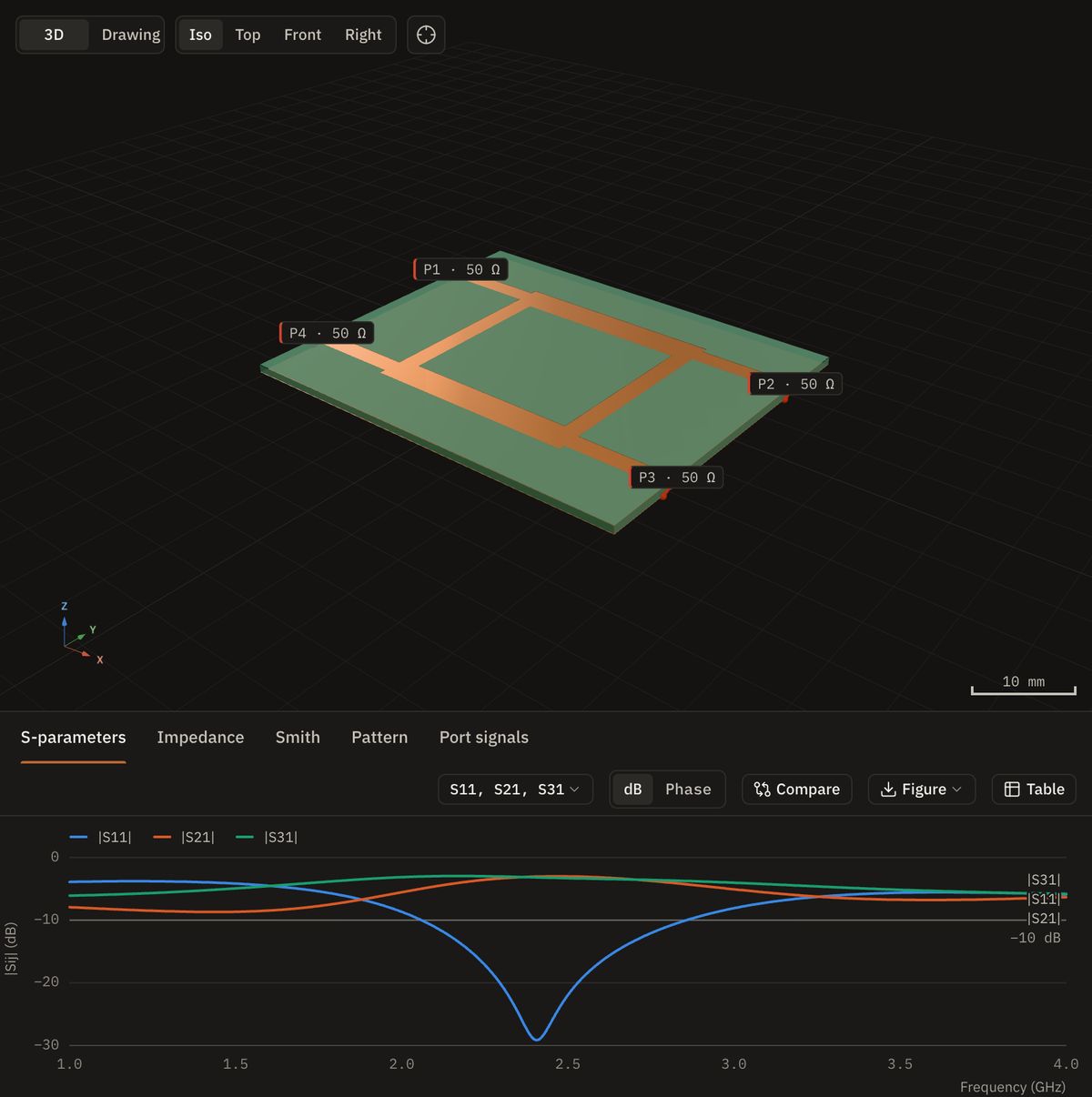
A 90° hybrid: −3.21 and −2.99 dB to the two outputs at 2.40 GHz, 90.0° apart, with the reciprocity and passivity of the four-port matrix checked.
Stepped-impedance low-pass
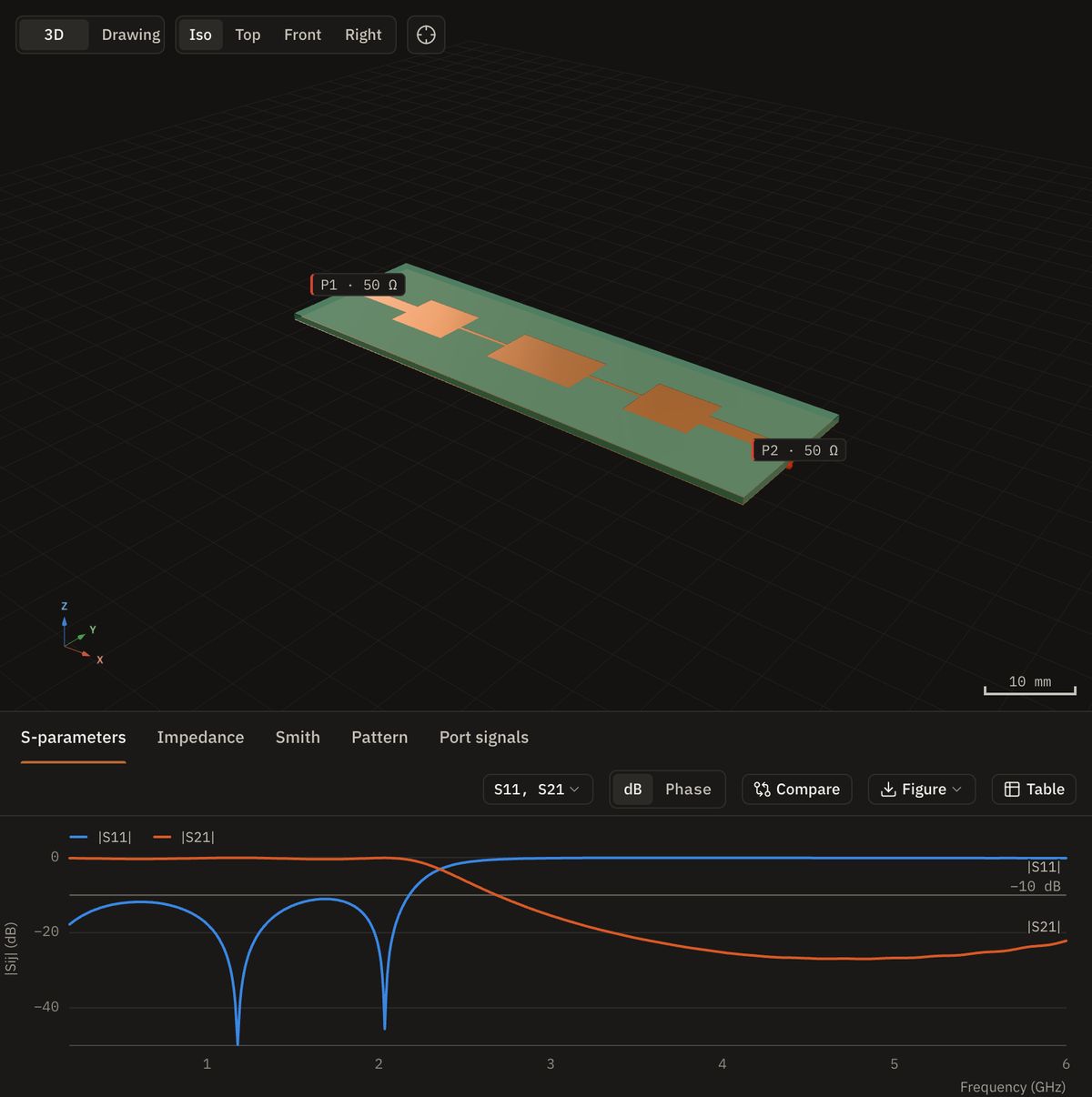
Alternating wide and narrow line sections: the −3 dB point lands at 2.356 GHz, 5.2 % below the ideal line cascade, because the steps themselves add capacitance.
The designer
Model, simulate and read the results in one window
A ribbon on one row
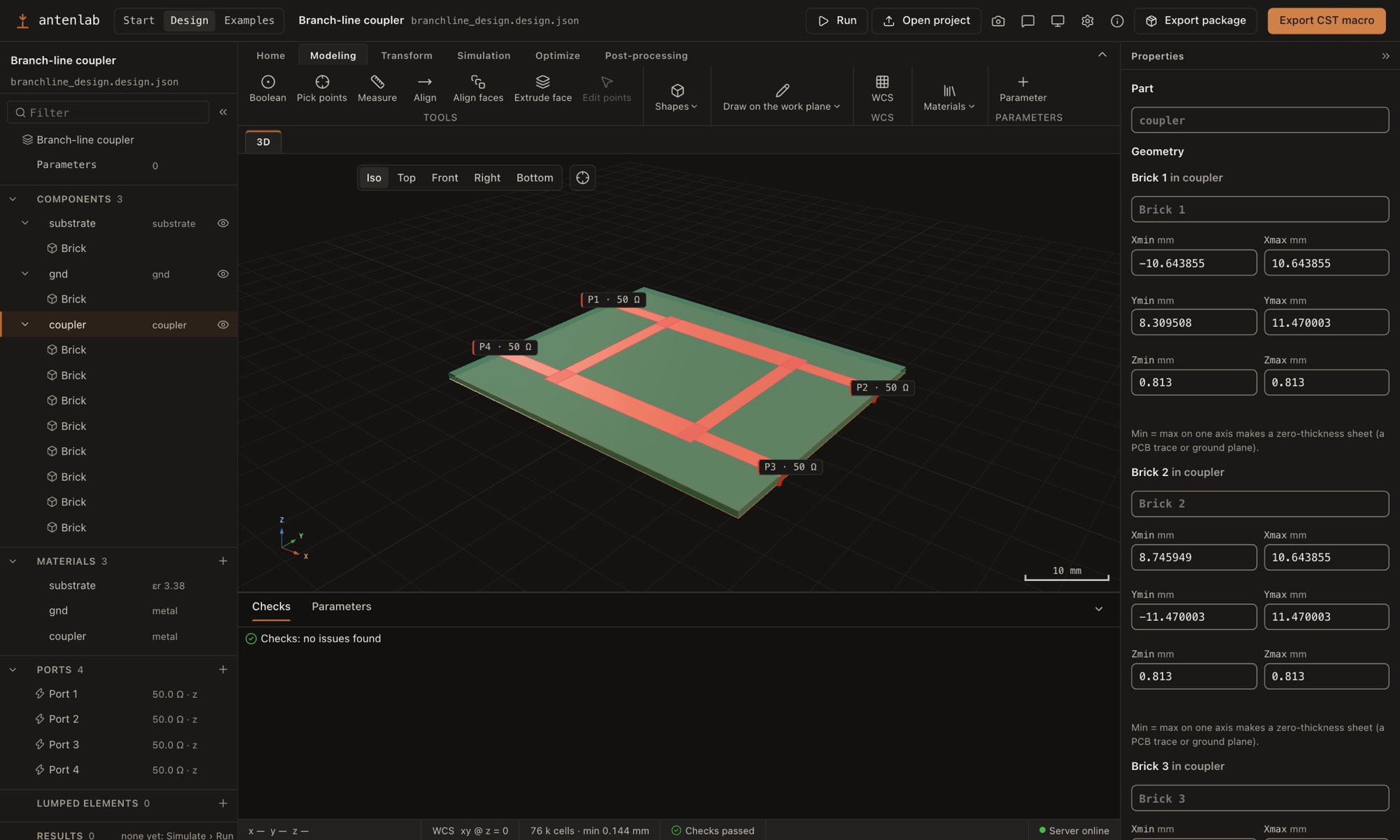
Home, Modeling, Transform, Simulation, Optimize and Post-processing on one row. Draw bricks in 3D, extrude a picked face, combine shapes with booleans, and move, rotate, mirror or scale them in one Transform dialog (Ctrl+T).
Tree and properties
Components, materials, ports, lumped elements, mesh and results in a navigation tree with drag and drop. The panels collapse, Undo, Redo and a modeling history keep track of the edits, and a Python panel sits alongside.
Runs under the design
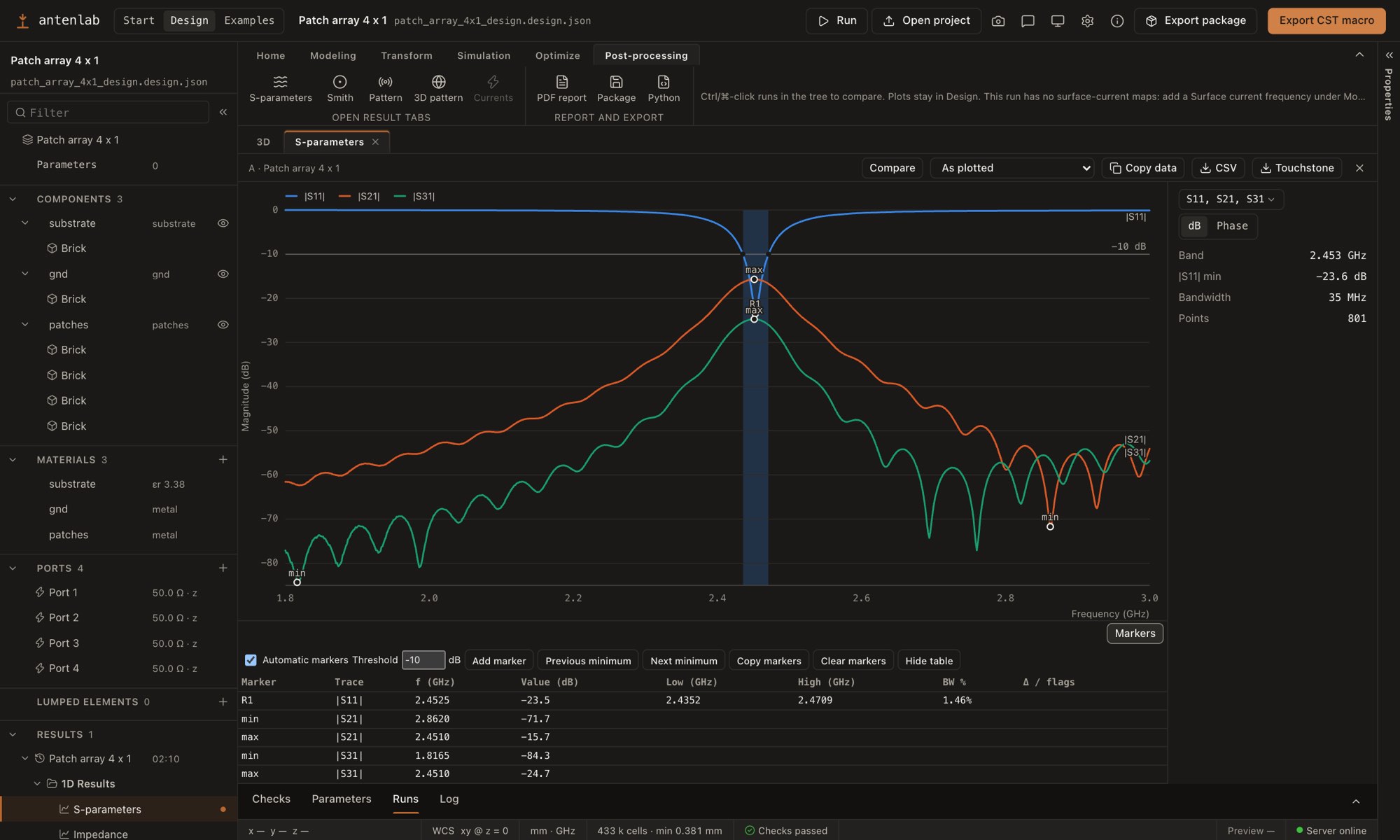
Every run is listed under Results with its S-parameters, far fields and surface currents. Picking one shows it in the 3D view: here the 4 × 1 array's pattern over its geometry.
Markers on every plot
Resonances and their bandwidth are marked, with a hover read-out, a two-marker bandwidth, your own markers and a table you can copy. Runs are compared by the parameters that differ.
One click out
Copy data or CSV in dB, phase, Re/Im or magnitude/phase, and Touchstone files. The ribbon adds a PDF report, an export package and the Python model, the header a CST-compatible VBA macro.
Real outputs
The files, as they come out
Features
What Fairbeam does
-
Ribbon-based designer
A one-row ribbon, a collapsible navigation tree, properties and dock, and a Python side panel. Bricks, cylinders, spheres, cones, tori, wires, polygons and extrusions; draw bricks in 3D, extrude a picked face, booleans, one Transform dialog, shortcuts, Undo, Redo and Save As.
-
Import a VBA macro
Reads a CST-compatible VBA macro or history list: parameters, materials, shapes, booleans, transforms, ports, resistors, monitors, the band, the boundaries and manual mesh lines. An import report lists every command that was skipped or changed, with its line.
-
Parameters and checks
Every length and frequency is an expression over named parameters. Checks run as you edit and explain what they found; a design without an excited port, or one that cannot converge, is refused before any solver time is spent.
-
Start templates and examples
Start from a half-wave dipole, a quarter-wave monopole, an open-ended waveguide, a printed sleeve dipole or a two-port microstrip line, or pick an example from a searchable list, which now includes a 2-element collinear and a 5-element Yagi for 867 MHz.
-
Import PCB artwork
Home › Import PCB turns DXF, Gerber and Excellon files into a design;
fairbeam import-pcbdoes the same from the command line. -
Automatic meshing
Auto mode picks the mesh settings for each design, and every field can be overridden. Thin PCB copper is meshed as sheets, converted examples keep their own mesh lines, and the mesher lands within 0.1 % of converged hand meshes.
-
Mesh convergence
Simulation › Mesh convergence… runs the design at finer automatic meshes until the resonance, |S11| and Dmax stop changing, and reports the density that converged. From the command line:
fairbeam converge. -
Run quality and one-click fixes
A run that did not converge, or whose numbers look suspicious, is flagged in the tree and on its results. Common design checks offer a fix in one click. Waveguide-port power is calibrated, so the pyramidal horn's efficiency reads about 99 %.
-
Parameter sweeps
Sequences, each over up to six parameters as ranges or value lists, checked before anything runs. The runs are queued, and every run of the sweep can be compared in one plot.
-
Goal-driven optimizer
Goals such as f0, |S11| at a frequency, bandwidth, Dmax or |Sij| limits, over as many parameters as you vary. Secant, Nelder–Mead, Bayesian, CMA-ES, particle swarm, genetic and trust-region searches, with live progress; the best result is kept to open, apply or save.
-
Multi-port S-parameters
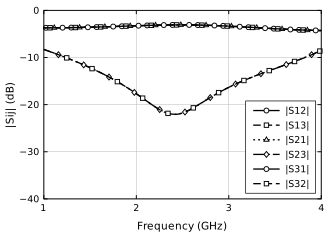
One openEMS run per driven port gives the full S-matrix of filters, dividers, couplers and arrays, with reciprocity and passivity checks, a picker for any Sij, a Smith chart per port and Touchstone
.sNpexport. -
Results with markers
Result tabs: S-parameters, impedance, VSWR, Smith chart, efficiency and patterns, with markers for resonances and bandwidth, hover read-outs and your own markers. Runs are compared by the parameters that differ; Copy data and CSV in dB, phase, Re/Im or magnitude/phase.
-
Result summaries and comparison
Headline numbers for each run in the tree and the Runs table, and Tables › Summary. A comparison table lists the parameters that differ between runs; copy it or save it as CSV.
-
2D and 3D field maps
The Field map tab shows E and H planes as heat maps with a read-out and the model's outline. Phase and Animate play a time-harmonic animation of the field, in 2D and in the 3D view.
-
Far field, currents, beams
3D patterns and polar cuts in directivity, gain, realized gain or RHCP/LHCP, with a card for Dmax, gains, radiation, mismatch and total efficiency and the main lobe. Optionally, the radiation and total efficiency over the whole band, computed after the run (about 0.3 s for 21 frequencies on the patch; the solver time does not change). Animated surface currents, and array beams steered after the run.
-
GPU engines
Optional GPU builds of openEMS: Metal on Apple silicon and CUDA on NVIDIA cards under Windows. The patch antenna takes 1.6 s instead of 10.6 s on an M5 Pro, and 2.6 s instead of 53 s on a Ryzen 9 with an RTX 3060. When a GPU build is installed it is the default, and the CPU engine stays available.
-
VBA macro, drawings, fabrication
A CST-compatible VBA macro rebuilds the model in the target program, and Touchstone or CSV files can be compared against the run. Dimensioned drawings, publication figures, a PDF report, and Gerber, drill and DXF files (preview).
-
Desktop app
For macOS and Windows, in English or Turkish (General settings › Language, native menus included, with a Decimal separator setting), with Save As, and a question before closing unsaved work. First start installs Python and openEMS for your user account; projects live in Documents/Fairbeam, and updates are offered in the app.
Results
Measured, with the source of every number
Validation
| Check | Fairbeam | Reference |
|---|---|---|
| Dipole Dmax | 2.13–2.15 dBi | 2.11 dBi (theory) |
| Patch resonance | 2.455 GHz | 2.513 GHz (TL model), −2.3 % |
Dipole: three lengths, 50 to 66 mm, end criterion −60 dB. Patch: converged mesh, against a transmission-line model. Details and commands in the validation notes of the repository.
Solver time in seconds
| Model | Cells | Apple M5 Pro | Ryzen 9 7900X | |||
|---|---|---|---|---|---|---|
| CPU | GPU | 4 threads | 24 threads | CUDA | ||
| Patch antenna, −60 dB | 0.26 M | 10.6 | 1.6 | 52.9 | 49.9 | 2.6 |
| 4 × 1 patch array (4 runs) | 0.45 M | – | 14.2 | 874 | 686 | 25.1 |
| Sierpinski monopole | 2.0 M | 12.0 | 2.7 | 61.1 | 65.7 | 3.4 |
The same models give the same results on both platforms. Runs that stop at the same timestep agree within 0.1 dB in every S-parameter and 0.004 dB in Dmax. The older Mac CPU runs checked the end criterion on a wall-clock schedule and stop at a different timestep, which moves only very deep |S11| nulls. The GPU engine is a separate openEMS fork (SeanMollet/openEMS, GPL-3.0, beta) built side by side; the CPU build stays the reference. The M5 Pro CPU time of the patch was re-measured on 2026-09-25 with the current model. Details and commands in the benchmark notes of the repository.
Circuits and arrays
| Check | Fairbeam | Reference |
|---|---|---|
| Microstrip line Z0 | 48.3 Ω | 50.0 Ω (Hammerstad) |
| Wilkinson split S21 = S31 | −3.09 dB | −3.01 dB (ideal) |
| Branch-line S21 / S31 | −3.21 / −2.99 dB | −3.01 dB each |
| Low-pass −3 dB point | 2.356 GHz | 2.485 GHz (ideal) |
| 4×1 array S11 / S22 | −23.5 / −17.0 dB | 4 GPU runs, 18 s |
Wilkinson with the textbook 100 Ω resistor: output match and isolation stall at −18.4 and −22.0 dB, because the odd-mode impedance at the outputs is about 34 Ω. The lumped resistor itself is exact; the cause is still an open question. Branch-line at 2.40 GHz: 90.0° between the outputs. Low-pass: the step discontinuities pull the cutoff 5.2 % below the ideal line cascade, as expected for this filter type.
Optimizer
| Task | Result | Cost |
|---|---|---|
| Dipole to f0 = 2.40 GHz | 2.4000 GHz | 2 evaluations, 2.0 s |
| Wilkinson: all ports ≤ −20 dB, S23 ≤ −25 dB | 82 Ω | 3 evaluations, 7.6 s |
| Wilkinson: S23 ≤ −35 dB | 73 Ω | 4 evaluations, 3.6 s |
The isolation resistor went from the textbook 100 Ω to 73 Ω in about 11 s; with all ports driven, 73 Ω gives S23 = −39.9 dB and every port matched below −24 dB.
Automatic mesh
| Model | Automatic | Converged |
|---|---|---|
| Dipole | 2.4182 GHz | 2.4198 GHz, −0.07 % |
| Patch antenna | 2.4525 GHz | 2.4550 GHz, −0.10 % |
Try the viewer here
The read-only example viewer of the app, as on /app, with the 14 example projects; the designer and the solver need the desktop app. It loads three.js and one example project: about 1 MB, roughly 350 KB compressed.
Roadmap
Where Fairbeam is, and where it is going
75 features available, 0 in development and 0 planned, from the project's issues and pull requests. Updated .
Available 75 items
In a release, or merged for the next one
Released in 0.7.0
-
Visual designer
Draw a parametric model, set up the simulation, run it and read the results in one window.
-
One-row ribbon
Home, Modeling, Transform, Simulation, Optimize and Post-processing on one row; the tree, dock and properties collapse, next to a Python side panel.
-
Draw in 3D and extrude faces
Draw a brick's base and then its height in the 3D view, or extrude a picked face into a new part.
-
One Transform dialog
Translate, scale, rotate and mirror in one dialog (Ctrl+T), with a live preview.
-
Booleans, polygons included
Add, subtract and intersect shapes, including polygons, with a colour-coded preview.
-
Pick points, align and measure
Use vertices, edge midpoints and face centres for corners and origins; align parts and measure between points.
-
Shortcuts and modeling history
A sheet of the keyboard shortcuts, and the session's modeling history.
-
A tree with context menus
Right-click menus on every node, show and hide, and drag and drop of parts into components.
-
Parameters in the dock
A table of every parameter next to Checks, with CSV and JSON import and export.
-
Checks that explain themselves
Click a warning to see what was found, why it matters and how to fix it.
-
Ports that find their ground
Add port here says what the port connects to and offers the other metals it found.
-
Import VBA macro
A CST-compatible VBA macro or history list becomes a design, manual mesh lines included, with a report of what was skipped or changed.
-
Save As
Save a design under a new name, in the app and from the File menu; Undo and Redo work from the menus too.
-
Checks for misplaced metal
New warnings for metal that overhangs its substrate or floats off the structure.
-
Surface current in the ribbon
Simulation › Monitors has its own Surface current button, next to Far field.
-
Start templates
A half-wave dipole, a quarter-wave monopole, an open-ended waveguide, a printed sleeve dipole and a two-port microstrip line to start from.
Designer Status: v0.7.0 -
Import PCB artwork
DXF, Gerber and Excellon files become a design: Home › Import PCB, or fairbeam import-pcb.
Designer Status: v0.7.0 -
One-click check fixes
Common design checks offer a fix you can apply with one click.
Designer Status: v0.7.0 -
Automatic meshing
The FDTD mesh is built from the geometry, within 0.1 % of converged hand-tuned meshes.
Simulation Status: v0.7.0 -
Multi-port S-parameters
Full S-matrices of filters, dividers, couplers and arrays, with Touchstone export.
Simulation Status: v0.7.0 -
Sweeps and optimizer
Sweep one or two parameters, or let the optimizer tune them towards your goals.
Simulation Status: v0.7.0 -
Metal GPU engine
An optional Metal build of openEMS on Apple silicon: several times faster, same results.
Simulation Status: v0.7.0 -
CUDA GPU engine
An optional NVIDIA engine on Windows, in the Run panel: the patch in 2.6 s instead of 53 s.
-
Thin copper as sheets
Realistic 35 µm PCB copper is simulated as sheets, so runs keep a practical time step.
-
Convergence checks
A run that cannot converge is stopped before it starts, with the reason and a fix.
-
Thin copper in exported models
A design exported to Python builds the same copper sheets as the designer's own run.
-
Auto mesh mode
The mesh settings are picked for each design, and any field can be overridden.
-
Parameter sweeps
Sequences over up to six parameters each, checked before they run, queued, and compared run by run.
-
A stronger optimizer
Live progress, the best result kept, any number of parameters, and Bayesian, CMA-ES, particle-swarm, genetic and trust-region searches.
-
No run without a port
A design with no port, or no excited port, is refused with a check instead of failing.
-
Examples keep their mesh
An example opened as a new project keeps its exact mesh lines, so it gives the same results.
-
Optimizer skips misplaced metal
Candidates the design checks refuse are skipped without a simulation and shown as Skipped.
-
GPU build by default
When the GPU build of openEMS is installed, the app starts with it and offers both engines; a general setting switches it.
-
Mesh convergence
Simulation › Mesh convergence… refines the automatic mesh until the results stop changing; fairbeam converge does the same from the command line.
Simulation Status: v0.7.0 -
Run-quality warnings
A run that did not converge, or whose numbers look suspicious, is flagged in the tree and on its results.
Simulation Status: v0.7.0 -
Far field, currents and beam steering
3D patterns, gain and efficiency, surface currents, and array beams steered after the run.
Results Status: v0.7.0 -
Drawings, reports and fabrication files
Dimensioned drawings, publication figures, a PDF report, and Gerber and drill files.
Results Status: v0.7.0 -
VBA macro export
A CST-compatible VBA macro rebuilds the model in the target program.
Results Status: v0.7.0 -
Solver times on reference machines
See how long the same model takes on an Apple M5 Pro and a Ryzen 9 with CUDA.
-
Every run kept
Each run keeps its own result, and Results opens the newest run instead of the preview.
-
Results in the design tree
Each run appears under its design, with its S-parameters, far fields, currents and log.
-
Post-processing tab
Selecting a result opens its plot, compare and export tools in the ribbon.
-
Markers
Resonances, a two-marker bandwidth, hover read-outs and your own markers, with a table.
-
Compare runs
Runs side by side, with the parameters that differ marked; copy or save several runs at once.
-
Complex formats and Touchstone
Copy data and CSV in dB, phase, Re/Im or magnitude/phase, and Touchstone export.
-
Result tabs
Results open as tabs in the main area, with an A/B/C table of the runs.
-
Animated surface currents
Phase-resolved surface currents play as a smooth animation in the 3D view.
-
Gain and polarization in patterns
3D patterns and cuts in directivity, gain, realized gain, or RHCP and LHCP for circular polarization.
-
Far-field card in the 3D view
Dmax, gain, realized gain, radiation, mismatch and total efficiency and the main lobe, next to the pattern.
-
Efficiency result
1D Results › Efficiency: mismatch efficiency over the band, with the radiation and total efficiency, per driven port.
-
Efficiency over the band
Optional radiation and total efficiency across the band from Simulation › Monitors › Efficiency, computed after the run without changing the solver time.
-
Result summaries
Headline numbers for each run in the tree and the Runs table, Tables › Summary, and a comparison table of the parameters that differ, to copy or save as CSV.
Results Status: v0.7.0 -
2D field maps with phase and animation
The Field map tab shows E and H planes as heat maps; Phase and Animate play a time-harmonic animation, in 2D and 3D.
Results Status: v0.7.0 -
Desktop app for macOS and Windows
Installs its own Python and openEMS on first start, for your account, without admin rights.
-
Updates in the app
New versions are offered in the app, checked against their signature, and install themselves.
Desktop app Status: v0.7.0 -
Sturdier on Windows
Proxies are honoured, interrupted downloads resume, and the server always stops with the app.
-
Clean updates and uninstall
On Windows, an update replaces the old files and uninstalling removes the whole folder.
-
GPU preference on Windows
“Prefer the GPU build” on the setup screen now works on Windows too.
-
Sharp on scaled displays
Layouts fit 125 % and 150 % Windows scaling and follow each monitor's pixel density.
-
Start, Design and Examples
Examples open read-only with their results; Open as new project turns one into a design.
-
Native menus and settings
File, Edit, View, Window and Help menus, an About dialog, general settings and native Save As for exports.
-
No lost work
Closing a project, the window or the app asks to save, discard or cancel when there are unsaved changes.
-
A window that fits
The window opens at a size that fits the screen, or maximized on smaller screens.
-
Turkish and English interface
General settings › Language, native menus included, and a Decimal separator setting.
Desktop app Status: v0.7.0 -
Searchable example picker
Find an example by name, with new 867 MHz collinear and Yagi examples.
Desktop app Status: v0.7.0 -
Validated results
Checked against analytical results.
Performance & quality Status: v0.7.0 -
Benchmarks on Mac and Windows
All 14 examples timed on both platforms, with matching results.
-
Honest efficiency figures
Efficiencies above 100 % are flagged, and runs report the end criterion they reached.
-
A faster, steadier designer
The 3D view reuses its geometry, and edits survive slow loads, saves and previews.
-
Keyboard access
Designer commands stay visible and every control can be reached from the keyboard.
-
Projects open reliably
A preview arriving mid-load can no longer replace the project you asked for.
-
Faster meshing of detailed designs
Automatic meshing of polygon designs and arrays runs 4 to 64 times faster.
-
A quicker designer
The Start screen opens in half the time, and checks and saves answer sooner.
-
Large designs stay responsive
Big polygon designs edit, preview and check faster, with identical results.
-
Horn efficiency
Waveguide-port power is calibrated, so the pyramidal horn's radiation efficiency reads about 99 %.
In development 0 items
Open pull requests and work under way
Nothing here right now.
Planned 0 items
Approved, not started yet
Nothing here right now.
Download
From download to a first simulation
Download the installer
It installs for your user account, without admin rights.
First start sets up the runtime
Python 3.13, the Python packages and openEMS, each pinned by SHA-256 and installed once into your user folder: 120–155 MB, about 20 s on a fast connection. An existing openEMS installation works too.
Examples in your Documents
The workspace is
Documents/Fairbeam: the example projects, their models and templates are copied there, and your designs sit next to them. Examples open read-only; Open as new project turns one into a design you can edit.Press Run
The Run dialog offers the CPU engine and, when one is installed, the GPU engine; the dock shows live progress, the field energy and the time left. The patch antenna takes 10.6 s on four CPU threads of an Apple M5 Pro, or 1.6 s with the optional Metal GPU engine, and about 53 s on four threads of a Ryzen 9 7900X under Windows.
Status
What to expect
- Development preview
- The designer, the solver pipeline and the results work end to end. The file formats are versioned (
fairbeam.design/1for designs,fairbeam.project/1for results); breaking changes bump the version. The source repository is not public yet. - VBA macro export not yet validated
- The exported CST-compatible VBA macro and the macro import are not validated for every command or physical port formulation; the macro import reports the commands that it skips or changes. Check an exported model in the target program before relying on it.
- Fabrication files not yet validated
- The Gerber, drill and DXF files are parsed back and checked against the geometry to 1 µm, but have not been opened in a Gerber viewer or sent to a fab. The simulation uses zero-thickness copper; clearances and footprints are yours to check.
- Wilkinson output match: open question
- With the textbook 100 Ω resistor the divider's output match and isolation fall short of theory. The resistor model is exact, so the cause is either the layout or the staircase mesh at the resistor node; a finer mesh at the resistor node will tell.
- Unsigned installers, macOS 27+
- The macOS app is signed and notarized by Apple. The Windows installer is not signed yet, so Windows SmartScreen warns. The macOS openEMS build needs macOS 27 or newer on Apple silicon. Linux has no installer yet; the Python package works with any openEMS installation whose Python bindings import.
- Licenses
- Fairbeam is GPL-3.0-or-later; openEMS is GPL-3.0-or-later and CSXCAD LGPL-3.0-or-later. The complete source of every released version is available on request: open an issue in fairbeam-releases. Project files are plain data produced by your own models.
Download
Download Fairbeam
Free desktop app. On first start it installs its runtime once for your user account: Python, the Python packages and openEMS. That is about 120–155 MB to download and 20–30 s on a fast connection, with no admin rights and nothing installed system-wide. You can also point it at an existing openEMS installation. Windows includes CPU support and offers optional NVIDIA GPU setup in Settings; no separate app installer is needed.
macOS 0.7.0: macOS 27 or newer; the app is signed and notarized. Windows 0.7.0: Windows 10/11, per-user install; SmartScreen warns because the installer has no Authenticode certificate (More info → Run anyway). Checksums are in SHA256SUMS.txt. Every version is on the releases page. Later versions are offered in the app.
Linux (preview): no installer yet. With repository access, scripts/install-openems-linux.sh builds openEMS (CPU) in your user folder and scripts/run-linux.sh opens Fairbeam in your browser. Tested on Debian 13 x86_64; see docs/LINUX.md.
New here? Read the getting-started guide: install, a first design, the run and its results in about five minutes.
# From source (repository access): macOS, Homebrew, Xcode CLT, Python 3.10+, Node.js 20+
# 1. Build openEMS + CSXCAD into ~/opt/openEMS and install Fairbeam into its venv (5–10 min)
scripts/install-openems-macos.sh

# 2. Run a model: writes public/projects/<slug>.json
~/opt/openEMS/venv/bin/fairbeam run python/models/patch_antenna.py

# 3. Start the viewer on http://127.0.0.1:5310, and the run server
npm install
npm run dev
npm run serve

# Linux (preview, CPU): build openEMS into your user folder, then open Fairbeam in the browser
scripts/install-openems-linux.sh
scripts/run-linux.sh

# the desktop app from source
npm run desktop:build